


-
Samantha Danforth replied to the topic Know a good supplier for patio umbrellas? in the forum GENERAL DISCUSSION 12 years, 2 months ago
Thanks! What a great website, lots of fabulous items to choose from.
-

ida replied to the topic Know a good supplier for patio umbrellas? in the forum GENERAL DISCUSSION 12 years, 2 months ago
Try archiproducts.com/en
-
ida replied to the topic Recommendations for Photoshop Rendering File Sizes? in the forum TECHNOLOGY 12 years, 2 months ago
The machine I use for PS is only an i3, 32-bit system with only 2gb ram, and a lousy GTS450 graphics card, but it doesn’t crash and it can handle the large 1gb+ PS files well. My machine doesn’t crash because it’s properly cooled and has the right amount wattage. So yes I agree with you, you don’t need a super computer, you just need a well built machine.
-

Paul Stafford replied to the topic VOTE NOW – Which AutoCAD linework tool is the most efficient? in the forum GENERAL DISCUSSION 12 years, 2 months ago
Thanks Goustan. I like Polyline – I’ll do a post about it and give the vote results soon.
Regards
Paul -
Paul Stafford replied to the topic VOTE NOW – Which AutoCAD linework tool is the most efficient? in the forum GENERAL DISCUSSION 12 years, 2 months ago
Thanks Vincent. I hear you – that’s my workflow too.
Regards
Paul -

Daniel Martin replied to the topic Where to start with LEED? in the forum GENERAL DISCUSSION 12 years, 2 months ago
Not to be picky, but you are actually looking to become LEED accredited, not certified. LEED certifies buildings and accredits people.
Having said that, I am a LEED AP and the process is fairly simple. You can do it in one step, taking two tests at once to be an AP, or in two steps, becoming a GA first and then an AP later.
Check out this page for…[Read more] -

Goustan BODIN replied to the topic Recommendations for Photoshop Rendering File Sizes? in the forum TECHNOLOGY 12 years, 2 months ago
I quite disagree with the ‘machine intensive’ comments : you do *not* need to work at such an accuracy that you need an NSA super-calculator to do your renderings. This will cost you an arm in Hardware investments for no purpose.
Like others said, keep you layer number down, blending and masking to what is required, 150dpi and you’ll be just fine,…[Read more] -
Goustan BODIN replied to the topic Please help us out: ASLA Sustainable Sites Webbie Award in the forum GENERAL DISCUSSION 12 years, 2 months ago
you got my vote 🙂
-
Goustan BODIN replied to the topic VOTE NOW – Which AutoCAD linework tool is the most efficient? in the forum GENERAL DISCUSSION 12 years, 2 months ago
Pline by far most efficient to me (voted already), though I prefer Spline. Barely ever use line.
-
Goustan BODIN replied to the topic Marketing yourself for employment. in the forum STORY BOARD 12 years, 2 months ago
move your butt on Linked-In, make a website/blog/FB, update your profiles everywhere, register to relevant job boards and set your alerts for all these websites. Now, you control everything from your email.
Make sure you display experience relevant to the region you aim for.+ what Tosh said.
-
Goustan BODIN replied to the topic Moving to Shenzhen, in need of design job in the forum SUSTAINABILITY & DESIGN 12 years, 2 months ago
Contact ALSA (Alain Landscape Studio and Associates) on my behalf.
http://www.alsa.net.cn/ -

Benjamin Boyd replied to the topic Master Plan Technics in PS in the forum GRAPHICS 12 years, 2 months ago
Also this technique would work with photo trees but not as well. We tend to steer clear of those in plan. Also as to layer masks, you really should be only using it instead of the erase tool. It can save you a ton of time in the long run if done right.
-
Benjamin Boyd replied to the topic Master Plan Technics in PS in the forum GRAPHICS 12 years, 2 months ago
Our office uses a single layer for trees of one type. You essentially have a blank tree shape and use the blending tools to apply texture, shadow, depth, or outline depending on your needs. Then you use the marquee tool to copy the shape around the same layer. This minimizes your file size as well as joining outline so they don’t overlap as they…[Read more]
-

Richard Kidger replied to the topic Master Plan Technics in PS in the forum GRAPHICS 12 years, 2 months ago
Hi, have you tried the clone tool, I create master files of trees with shadows locked, then clone/stamp.
-

Cherisse Otis, LEED AP BD+C replied to the topic Master Plan Technics in PS in the forum GRAPHICS 12 years, 2 months ago
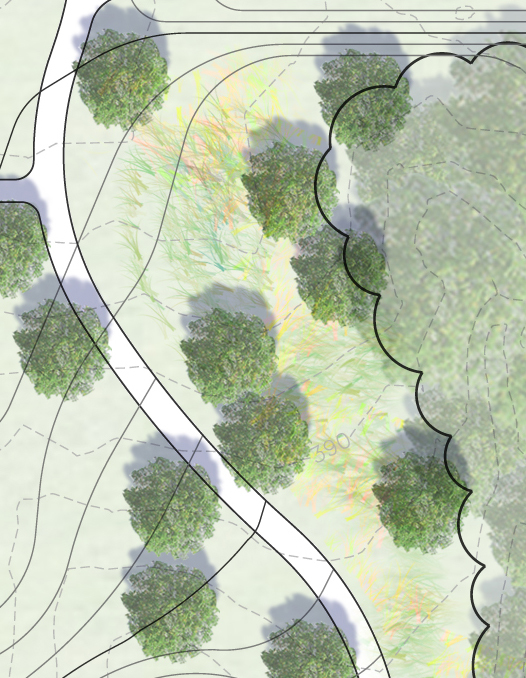 Obviously a different project type but tree-wise, similar enough example. This is a tree symbol I use frequently – it is high enough resolution that when I zoom in, it’s still quite crisp. They are all on one layer and copied around the page, shadow added to entire layer. You could easily create 3-4 different similar layers if you wanted to var…[Read more]
 -

Calico replied to the topic Master Plan Technics in PS in the forum GRAPHICS 12 years, 2 months ago
Hmm…. normally when I get to PS, design is pretty much complete, so maybe i’m missing something. Moving stuff around in P’S means I have to repeat the feat in Acad when going past planning level… and I have to keep track of more moving parts. Creating a separate PDF for each type of entity (canopy trees, evg trees, bldgs, cars, etc.) is not…[Read more]
-

Thomas J. Johnson replied to the topic Master Plan Technics in PS in the forum GRAPHICS 12 years, 2 months ago
It sounds like you are going for a realistic as opposed to artistic rendering. For that style, you’re probably better off having your trees/shadows/ground plane colors and textures figured out in CAD, so you’re plotting straight from CAD instead of using photoshop. I’ve achieved very good and pretty realistic results this way…Alternately, for a…[Read more]
-
Cherisse Otis, LEED AP BD+C replied to the topic Master Plan Technics in PS in the forum GRAPHICS 12 years, 2 months ago
You’re right – the flexibility of having the vectors to move them around and edit is nice, and of course they are more crisp than rasterized objects. I have two ways that I typically approach rendering master plan trees. One method is to use a high-resolution plan tree image that I don’t anticipate needing to change and marquee tool it + alt…[Read more]
-

nca replied to the topic Master Plan Technics in PS in the forum GRAPHICS 12 years, 2 months ago
you need to rasterize the objects and use the marquee tool to copy to keep them on the same layer.
-
Cherisse Otis, LEED AP BD+C replied to the topic Master Plan Technics in PS in the forum GRAPHICS 12 years, 2 months ago
I would ask if it is necessary to use vector objects for trees at the master planning level. I find that after you reach a small enough scale with graphics (30/40 scale or smaller), there’s no need to maintain that level of clarity with individual objects.
- Load More
Activity

Login
Lost Password
Register
If this is your first time on the new site, please click "Forgot your password?". Follow the steps to reset your password. It may be the same as your old one.